Internet of Things and Biometric Authentication
Fingerprint-Based Hostel Outpass Management System with Automated Late-Entry Alert
Department of Computer Science and Engineering (IoT, Cybersecurity Including Blockchain), Alva’s Institute of Engineering and Technology, Moodbidri, Karnataka, India
Published November 2026
Abstract
Hostel outpass control in many colleges still depends on a paper register, a signed slip and a watchman who inspects it by eye. This arrangement allows slips to be forged or reused, stalls when the warden is unavailable, and gives no live picture of who is outside the hostel, so late returns often surface only at the next headcount. This paper presents a fingerprint-based outpass kiosk built on a Raspberry Pi 4 with an R307/R305 optical fingerprint sensor, a 16×2 LCD and a buzzer. A student’s fingerprint is matched against an enrolled database; on a successful match the system decides whether the scan is an exit or a return and records the event, with the student’s name, USN, hostel, date, out-time and expected return time, in a MySQL/Firebase database. The record reaches a warden-facing web dashboard over Wi-Fi within seconds. On return, the actual time is compared with the expected time and a late-entry flag is raised automatically, with no manual check. In testing, a fingerprint match took roughly one to two seconds, the dashboard reflected each scan within a few seconds, and every staged late return was flagged correctly. Because the credential is the student’s own finger, it cannot be casually lent to a friend in the way a card, tag or slip can.
Keywords: fingerprint authentication; biometric access control; hostel outpass; Raspberry Pi; late-entry alert; IoT; real-time monitoring; web dashboard
1Introduction
The outpass routine in a college hostel is familiar to every resident: fill in a slip, obtain a signature from the warden or class advisor, and show it to the watchman at the gate. The routine has survived for years, and its weaknesses are usually accepted as normal. Slips are copied or reused, approvals wait on whoever is free to sign, and once a student has left, nothing tracks the absence until the student walks back in. If someone fails to return on time, no one is told automatically; a person has to notice, which in practice often happens the next morning.
Biometric hardware is now cheap and dependable enough to replace such manual checkpoints using off-the-shelf parts. Fingerprint recognition was chosen here for a simple reason: it is the one credential that cannot be handed over. An ID card can be borrowed, an RFID tag shared, a QR code screenshotted and a phone lent for a few minutes. A finger cannot. Fingerprints also suit a gate environment better than faces, since matching does not depend on lighting, headwear or camera angle [4].
This paper describes a self-contained outpass kiosk built around a Raspberry Pi 4. An R307/R305 sensor captures the print, an LCD gives the student immediate feedback, and a buzzer signals a rejected scan. No smartphone or extra card is needed. A warden dashboard on the hostel Wi-Fi shows who is out and who is due back without a walk to the gate.
The paper is organized as follows. Related work is reviewed and the gap addressed here is identified; the problem is then stated, followed by the proposed system and its architecture, the methodology, the hardware and software, and the implementation, including enrollment, the data model and the late-return rule. Security and privacy are then analyzed, testing and results are reported, limitations are discussed, future scope is outlined, and the paper concludes.
2Related work
2.1Fingerprint and Raspberry Pi attendance systems
Chauhan et al. [1] developed a Raspberry Pi attendance system that pairs a fingerprint module with GSM connectivity to keep subject-wise logs and retire the paper register. It shows that a Pi can handle biometric capture and logging in real time, but it is scoped to a lecture hall and does not consider what happens after a person leaves the monitored space. A comparable design on the lower-cost Raspberry Pi Pico, with a Flask/Django front end and an SQL back end [2], indicates that such systems do not need expensive hardware, yet it also only marks classroom presence. A Wi-Fi-based system [3] dispenses with fingerprints and detects enrolled devices over a locally formed access point; although not fingerprint-based, it supports the use of a single board’s built-in Wi-Fi as the only network link.
2.2Camera-based systems
Face recognition has been combined with mask detection and temperature screening on three Raspberry Pi models, reaching roughly 95% accuracy for the best method but only two to four frames per second, with clear sensitivity to lighting and camera placement [4]. A hospital-staff attendance system using Local Binary Pattern Histograms on a Raspberry Pi reports similar throughput and lighting constraints [5]. These findings explain why this work avoids cameras: a single-finger scan at a fixed kiosk faces no lighting, occlusion or angle problem.
2.3RFID-based gate and campus systems
SMARTGATE [6] couples RFID scanning with servo-controlled gate hardware and automatic parental notification through a web dashboard. It is close to the warden-notification part of this work, but its credential is a card, which can be lent as easily as a paper slip can be copied. A later design adds facial recognition to RFID on edge-processing Raspberry Pi hardware for two-factor entry [7]; this stacks factors, adding cost and a second failure point, instead of removing transferability at its root. Earlier gate-pass work [8, 9] showed that replacing a paper logbook with a dashboard-visible digital record has value in itself, and a campus smart-entry system [10] applies RFID cards with a time allowance for staff and students, which is close in spirit to an outpass but inherits the same shareable-credential weakness.
2.4Research gap
The surveyed work shows that a Raspberry Pi can run biometric capture, local display and network logging together, and that fingerprint sensors are faster and more consistent than cameras at a fixed kiosk. None of the systems, however, combines an untransferable biometric credential with an automatic time-window late-return alert that needs no manual check. RFID systems address digital records but not transferability; fingerprint systems address the credential but target classroom attendance with no return leg. This gap is what the proposed system fills.
| System | Credential | Setting and return handling |
|---|---|---|
| [1, 2] | Fingerprint | Classroom attendance; no return leg |
| [3] | Enrolled device (Wi-Fi) | Attendance; credential is a device |
| [4, 5] | Face | Attendance; lighting and frame-rate limits |
| [6] | RFID card | Campus gate with parental notification |
| [7] | RFID + face | Gate entry; two stacked factors |
| [10] | RFID card | College entry with time allowance |
| Proposed | Fingerprint | Hostel exit and return with automatic late flag |
3Problem statement
A manual outpass process fails in several ways. Slips can be forged or reused because nothing on paper is unique to its bearer. Approvals bottleneck around whichever staff member is available. Times written by hand under pressure are often illegible, inconsistent or missing. A late student is caught, if at all, during a periodic audit, by which point real-time tracking has lost its purpose. Parents and senior staff have no live visibility. What is needed is a system that ties the outpass to something that cannot be passed to another person, keeps a searchable record, and watches the clock without relying on anyone to notice.
4Proposed system and architecture
The system replaces both the paper slip and card-based gate passes with one fingerprint check at a kiosk. The student places a finger on the sensor; the system captures the print, matches it against the enrolled database and, on success, decides whether the event is an OUT or a RETURN for that student.
For an OUT event, the system creates an outpass record containing the name, USN, hostel, date, out-time and expected return time, and writes it to the database. Since the kiosk is on the hostel Wi-Fi, the record appears on the warden’s dashboard within seconds. When the student scans again on return, the system logs the actual return time and compares it with the expected time. If the student is late, the record is flagged on the dashboard automatically.
Fingerprint authentication is used on its own. Face recognition was rejected for the reasons given in the related-work review (lighting sensitivity, angle dependence and low throughput on embedded hardware), and RFID or QR credentials were rejected because they can be passed between students.
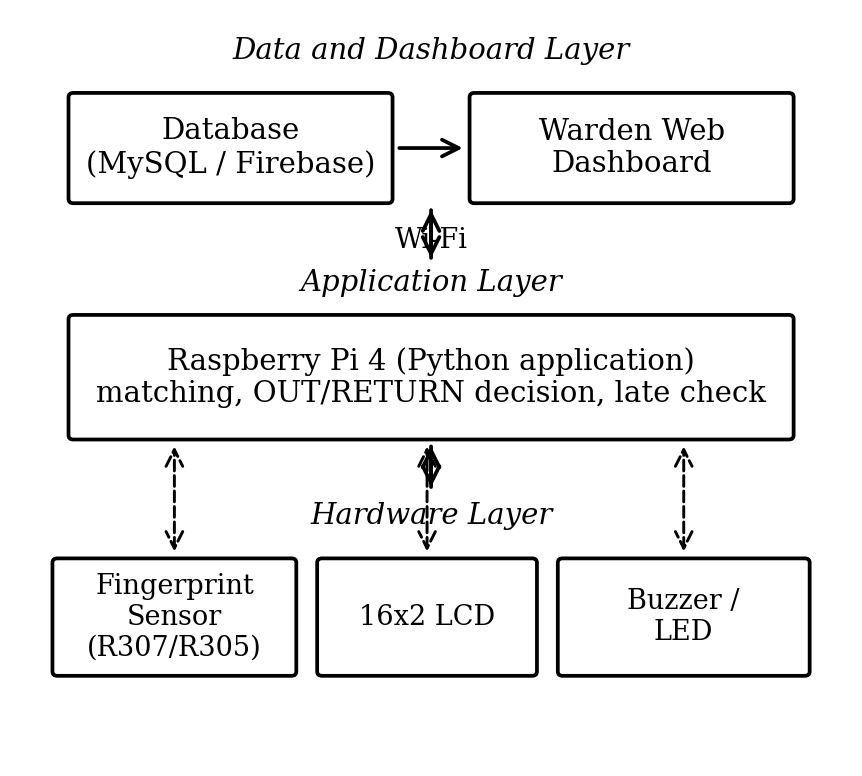
The architecture has three layers (Figure 1). The hardware layer holds the fingerprint sensor, LCD and buzzer, connected to the Pi over UART and GPIO; it only captures input and gives feedback. The application layer is a Python program on the Raspberry Pi 4 that performs matching, decides OUT or RETURN, applies the late check, drives the LCD and buzzer, and talks to the network. The data and dashboard layer comprises the database (MySQL or Firebase, depending on deployment) and the warden’s web dashboard, reached over the Pi’s built-in Wi-Fi through a MySQL connector or the Firebase SDK/REST interface. Because of this separation, the dashboard can be opened from any device on the network with no extra software at the gate.
5Methodology
Development followed four stages. First, hardware bring-up: the sensor, LCD and buzzer were each connected to the Pi and verified with small standalone Python scripts. Second, the application layer, a single program joining fingerprint matching, record creation, display control and database writes. Third, the back end and dashboard: a schema for student, outpass and return-status records, and a browser dashboard for the warden. Fourth, end-to-end testing, including deliberately staged late-return scenarios to confirm that the alert fires when it should.
The control logic is a polling loop (Figure 2):
- 1. Initialize the sensor, LCD, buzzer and network on startup.
- 2. Poll the sensor for a finger placement.
- 3. Capture the image and compare it with the enrolled database; if there is no match, show “Access Denied” and sound the buzzer.
- 4. On a match, fetch the name, USN and hostel, and check whether an open outpass record exists for the student.
- 5. If none exists, treat the scan as OUT: record the date and out-time, set the expected return time and store the record.
- 6. If one exists, treat the scan as RETURN: log the return time, mark the record returned and compare the time with the expected one.
- 7. If the return is late, set the late flag and push an alert to the dashboard, then resume polling.
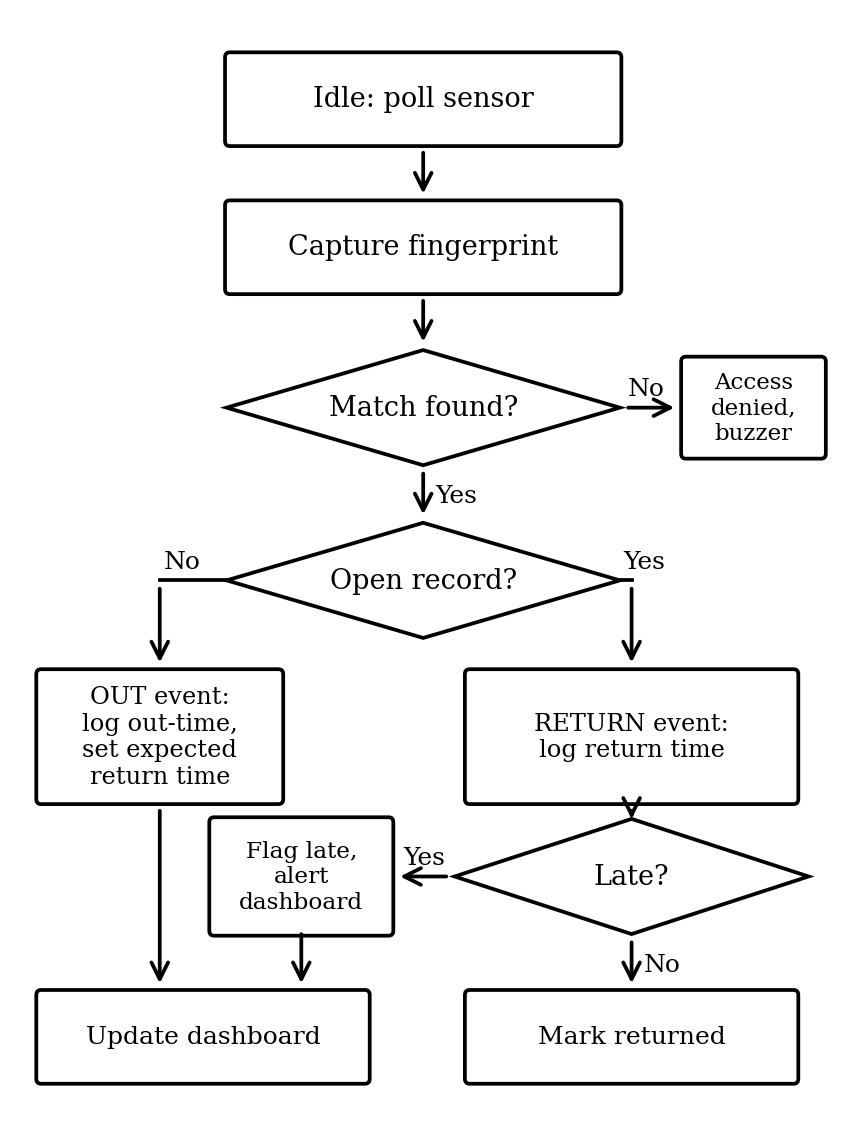
Because direction is inferred from the existence of an open record, one sensor serves both entry and exit, and no separate exit and entry readers are required.
6Hardware and software
| Component | Specification/role |
|---|---|
| Raspberry Pi 4 | Quad-core Cortex-A72 SBC, 4/8 GB RAM; runs the application, database client and Wi-Fi link |
| R307/R305 sensor | Optical module over UART; fingerprint capture and minutiae matching |
| 16×2 LCD | I2C or parallel; shows the student’s name on a match or an access-denied message |
| Buzzer / LED | Audible and visual cue for a failed scan |
| Power supply | 5 V/3 A USB-C for the Pi, with a regulated line for the peripherals |
| microSD (32 GB+) | Holds the OS and buffers records during a network outage |
| Enclosure | Houses the sensor and LCD at the hostel gate |
| Software | Purpose |
|---|---|
| Raspberry Pi OS (64-bit) | Base operating system |
| Python 3.x | Sensor handling, matching and late-check logic, API calls |
| pyfingerprint / Adafruit Fingerprint library | Driver-level communication with the sensor over UART |
| RPi.GPIO / smbus2 | GPIO and I2C handling for the LCD and buzzer |
| MySQL Server / Firebase Realtime DB | Stores student, outpass and return-status records |
| Flask/Django + HTML/CSS/JS | Back end and front end of the warden dashboard |
| Firebase Cloud Messaging / SMTP | Optional delivery path for late-entry alerts |
7Implementation
Each outpass record stores the student’s name, USN, hostel, date, out-time, expected return time, return time and a late flag. The authoritative copy lives in the database. The warden’s dashboard offers two views: a live list of students currently out with their expected return times, and a searchable history of past records in which late returns are clearly marked.
If the Wi-Fi link drops during an OUT event, the record is buffered on the microSD card and synchronized once the connection returns, so a short outage does not lose data. The application is a single Python process running the polling loop; matching, display updates, buzzer control and database writes all occur in that one flow, which keeps the kiosk simple to deploy and reason about.
7.1Enrollment
Each student is enrolled once at the kiosk under warden supervision. The finger is captured twice, as the sensor module requires to merge two images into one feature template, and the template is stored in the module’s on-board library under a numeric ID. The warden then links that ID to the student’s name, USN and hostel in the student table. At run time the sensor returns the matched ID, which the application resolves to the student; the Raspberry Pi therefore never needs to handle raw fingerprint images.
7.2Data model
The database holds three kinds of record, summarized in Table 4. An outpass record is created by an OUT scan and closed by the matching RETURN scan; a student has at most one open record at a time, which is what lets a single sensor serve both directions.
| Table | Main fields |
|---|---|
| student | sensor ID, name, USN, hostel |
| outpass | record ID, sensor ID, date, out-time, expected return time, return time, status |
| alert (optional) | record ID, time raised, delivery state |
7.3Late-return rule
Let te be the expected return time stored with the record and tr the time of the RETURN scan. The record is marked late when tr > te + g, where g is a grace period set by the hostel (zero by default). The status field then takes one of three values: OUT while the student is away, RETURNED when the return is on time, and RETURNED_LATE otherwise. Because the comparison runs on the kiosk at the moment of the scan, no operator action is involved, and the status is pushed to the dashboard together with the return time.
8Security and privacy considerations
A gate system is only useful if it is hard to cheat, so the main threats are considered against the design in turn.
- Forged or reused slips: there is no slip. The record is created by the sensor event and exists only in the database, so there is nothing to copy.
- Borrowed credential: a card or tag can be lent, whereas a finger cannot be separated from its owner, which is the central reason for the choice of biometric.
- Duplicate scans: a second scan by a student who already has an open record is treated as a RETURN, never as a second OUT, so one student cannot hold two simultaneous outpasses.
- Record tampering: the database should sit behind authenticated access, and the dashboard should require a warden login and be served over an encrypted connection so that records and alerts are not exposed on the hostel network.
- Spoofing: an optical sensor can in principle be deceived by an artificial fingerprint. The design relies on the kiosk being at a supervised gate; sensors with liveness detection are the intended remedy for unsupervised installations.
On privacy, biometric data is sensitive. Matching is performed inside the sensor module on feature templates, so raw images are not stored by the application, and the dashboard shows only the fields needed for outpass supervision. Enrollment should be preceded by the student’s consent, and templates should be deleted when a student leaves the hostel.
9Testing and results
Testing had two passes. Unit tests covered the sensor, LCD, buzzer and database layer individually. Integration tests then covered the full OUT path, the full RETURN path, network resilience during a transaction, and several simulated students scanning in quick succession to confirm that records were not mixed up.
| Test case | Result |
|---|---|
| Enrolled finger scan (OUT) | Record logged, dashboard updated: Pass |
| Unenrolled finger scan | Access denied on LCD, no record created: Pass |
| On-time return scan | Marked “Returned”, no alert: Pass |
| Late return scan | Marked “Returned – Late”, alert pushed to dashboard: Pass |
| Wi-Fi loss during OUT event | Record buffered locally, synced after restore: Pass |
| Rapid consecutive scans | Each record correctly attributed, no mix-up: Pass |
The sensor took roughly one to two seconds to register a match, and the dashboard reflected new and updated records within a few seconds of each scan, consistent with the aim of giving the warden a live view without checking a register. In every staged late-return trial the late flag was raised correctly, and no false positives or missed flags were observed.
10Discussion and limitations
The results indicate that the single-checkpoint design works in practice: inferring OUT versus RETURN from an open record caused no ambiguity, even with back-to-back scans from different students. This removes the need for separate entry and exit hardware. Compared with the RFID systems in Section II, the fingerprint approach addresses transferability at its source instead of compensating with a second factor, as in [7], or with parental notification over a shareable card, as in [6]. Compared with the fingerprint attendance systems [1, 2], the expected return time and automatic late check turn a one-way attendance mark into an outpass with a return leg.
Testing also exposed limitations:
- A single sensor limits throughput, and a queue can form at peak exit times such as the start of a weekend.
- Finger angle, moisture, scarring or dirt can occasionally force a repeat scan, in line with false-rejection behavior reported for optical sensors.
- A long Wi-Fi outage delays alert delivery to the dashboard, although records stay buffered locally.
- Optical sensors can in principle be fooled by artificial fingerprints; liveness detection is not yet implemented.
- Only the warden is notified; parents are not.
11Future scope
A proactive overdue alert, raised when the expected time passes without a RETURN scan rather than only when the student eventually returns, would let the warden act sooner. Parent-facing notifications sent alongside the warden’s update would close a visibility gap for families. A student mobile app would let residents check their own outpass history. A PIN could be added as a second factor during examination periods, and sensor liveness detection would harden the system against spoofing. The same kiosk design could also serve gated communities, office campuses and other settings with an exit-and-return pattern and a time expectation.
12Conclusion
This paper presented a fingerprint-based hostel outpass system built on a Raspberry Pi 4, an optical fingerprint sensor and a web dashboard. It replaces the forgeable paper slip and the transferable gate card with a biometric credential tied to the student, logs each exit and return automatically, and flags late returns without requiring a watchman or warden to compare times by hand. Testing showed quick matching, near-live dashboard updates and correct late detection in every staged trial. The distinguishing contribution is the combination of an untransferable credential and a fully automated time-window late alert in one low-cost pipeline, which was not found together in the systems surveyed.
References
- [1]Chauhan R, Negi S, Kumar A, Devliyal S. A Raspberry Pi based smart attendance system. In: Proc. 2024 Int. Conf. Automation and Computation (AUTOCOM), Dehradun, India. 2024. p. 612–617. https://doi.org/10.1109/AUTOCOM60220.2024.10486161
- [2]Fingerprint based portable attendance monitoring system using Raspberry Pi Pico [Internet]. IEEE conference publication; 2024. https://ieeexplore.ieee.org/document/10498230/
- [3]Banepali A, Kadel R, Guruge DB, Halder SJ. Design and implementation of Wi-Fi based attendance system using Raspberry Pi. In: Proc. 2019 29th Int. Telecommun. Networks and Applications Conf. (ITNAC). 2019. p. 1–6. https://doi.org/10.1109/ITNAC46935.2019.9077985
- [4]Attendance system based on face recognition, face mask and body temperature detection on Raspberry Pi [Internet]. IEEE conference publication; 2021. https://ieeexplore.ieee.org/document/9573182/
- [5]Raspberry Pi based contactless attendance monitoring system for hospitals [Internet]. IEEE conference publication; 2022. https://ieeexplore.ieee.org/document/10010964/
- [6]Mendoza MLC, Malabanan AS, Castor T, Cerna PD. SMARTGATE: IoT-RFID intelligent entry logging gate system with parental notification. In: Proc. 2025 2nd Int. Conf. Electronic Circuits and Signaling Technologies (ICECST). 2025. https://doi.org/10.1109/ICECST66106.2025.11307438
- [7]Edge-assisted and scalable IoT gate automation system using hybrid RFID-facial biometric authentication [Internet]. IEEE conference publication; 2025. https://ieeexplore.ieee.org/document/11386060/
- [8]Gowtham I, Sathishkumar T, Lakshmiprasad S, Arumugam P, Rao GP. Automation of visitor gate pass management system. In: Proc. 2019 2nd Int. Conf. Intelligent Computing, Instrumentation and Control Technologies (ICICICT), Kannur, India. 2019. p. 1643–1646.
- [9]Hilary R, Machuve D, Mirau S. Mobile application for gate pass management system enhancement. In: Proc. 2021 IEEE AFRICON. 2021. https://doi.org/10.1109/AFRICON51333.2021.9570919
- [10]Smart entry system for college using IoT and RFID [Internet]. IEEE conference publication; 2024. https://ieeexplore.ieee.org/document/10434046/