Cyber Security and Safety
PhishShield: A Multi-Modal AI-Based Anti-Phishing Detection Platform
Department of Computer Science and Engineering, Knowledge Institute of Technology, Salem, Tamil Nadu, India
Published November 2026
Abstract
Phishing is a trick in which a fake website pretends to be a real one, such as a bank, to steal a person’s password or money. Many existing tools check only one thing, such as whether a link appears on a blacklist. A new fake site that is not yet listed can pass such a check. This paper proposes PhishShield, a platform that studies a website through five separate channels: the URL text, the HTML code of the page, the SSL certificate, the domain registration record (WHOIS), and a screenshot of the page. Each channel gives its own risk score between 0 and 1. A weighted sum then combines these scores into one final score. If the final score crosses a set limit, the user sees a warning and the event is saved in a log. The system is built as small separate services using FastAPI, so that each part can be changed without touching the others. This is a design paper. Testing is planned and is described in the Future Work section.
Keywords: browser extension; late fusion; phishing detection; weighted scoring; web security
1Introduction
1.1Background
Today, many people in Tamil Nadu pay bills, send money and fill in forms on their phones. Along with this, fraud messages have become common. A typical one is an SMS or WhatsApp message saying “your electricity bill is unpaid, pay now”, “your bank KYC has expired”, or “your parcel is held, pay a small fee”. The message carries a link. The link opens a page that looks like the real bank or service, and it asks for a card number, an OTP or a password. This is phishing.
A phishing site is cheap to make and easy to throw away. An attacker can copy a bank’s logo and colours in a short time and use the site for a few days before moving to a new address. Because of this, a defence has to work on websites it has never seen before.
1.2Problem statement
Most common protections have the following weaknesses:
- 1. Blacklists need time. A site must be reported and checked before it is listed. Sheng et al. [2] found that blacklists were slow to add new phishing sites, which leaves a gap at the start of an attack, when most people are tricked.
- 2. A single check can be fooled. A tool that reads only the URL cannot see that the page looks like a bank. A tool that only compares screenshots may not notice that the page is hosted on a domain registered two days ago.
- 3. Link tricks. Attackers use look-alike spellings (for example, replacing the letter “l” with the number “1”), long confusing links, and shortened links.
1.3Objectives
The objectives of this work are: to check one website through five different channels instead of one; to combine the five results into one easy-to-read score; and to keep the system simple enough that the team can explain, test and improve every part of it.
2Literature review
We read the following papers to understand what has been done and where our work differs. We group them by the kind of information they use.
2.1URL and domain information
Ma et al. [1] trained a classifier using the words in a URL and host details such as where the site is hosted. They showed that the link alone carries useful signals. Their work does not look at the page content or its appearance, while PhishShield adds both.
Sahingoz et al. [3] extracted text-based features from URLs and compared seven machine learning classifiers. Random Forest gave the best result among them. This supports our choice of a simple, well-understood model for the URL channel. Our work differs because the URL is only one of five inputs.
Le et al. [4] built URLNet, which reads the URL as a string of characters and words using convolutional networks, so no hand-made features are needed. It learns well from text, but it still sees only the URL. A page with a clean-looking URL on a hacked real website would not be caught by it alone.
2.2Page content
Rao and Pais [5] combined URL features, page-source features and third-party information in one feature-based framework. This is close to our idea of using more than one source. The difference is that their features are merged into a single model, while we keep each channel separate and combine only the final scores.
Jain and Gupta [6] used information about the hyperlinks inside the HTML page, such as where links and forms point. Their approach runs on the user’s side, with no need to look up outside services. We use a similar idea in our HTML channel, but we add certificate, registration and visual checks.
2.3Visual similarity
Abdelnabi et al. [7] trained a neural network to judge whether a page’s screenshot looks like a trusted site, and they released a dataset of such screenshots. Phishing pages that copy a brand’s look can be caught this way even if the URL looks harmless. Their system uses only the screenshot.
Lin et al. [8] built Phishpedia, which finds the logo on a page and checks which brand it belongs to. If the brand and the domain do not match, the page is flagged. It also tells which brand is being imitated. Like [7], it relies on the visual channel alone.
2.4Blacklists
Sheng et al. [2] studied how well phishing blacklists worked. As noted above, new sites often stay unlisted for some time. This is the main reason we want a method that does not depend on a list.
2.5Summary of the gap
The papers above each handle one or two kinds of information well. We did not find in this reading a simple design that keeps all five channels separate and combines them by a visible weighted score that a student can explain and adjust. PhishShield aims to fill this gap. We make no claim yet that it performs better, because testing is still to be done.
3System architecture
A user, or the browser extension, sends a URL to the PhishShield server. The server starts five checks, one for each channel. Each check returns a number between 0 and 1, where a higher number means higher risk. A fusion module then combines the five numbers into one final score. If the score is below the limit, the page is allowed. If it is at or above the limit, the user sees a warning banner, and the event is stored in a log that appears on an admin dashboard (Figure 1).
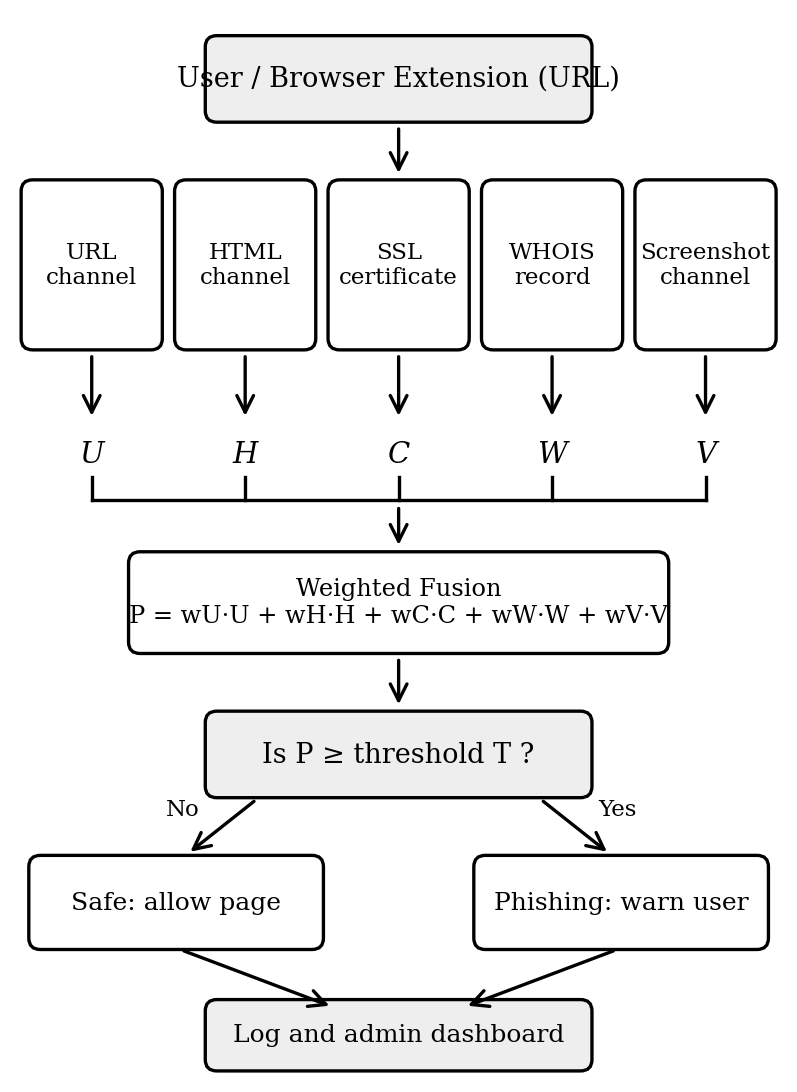
The five channels are:
- 1. URL channel: looks at the link text, such as its length, the number of subdomains, use of an IP address instead of a name, odd symbols, and look-alike spellings.
- 2. HTML channel: looks at the page code, such as login and password boxes, hidden elements, embedded frames, and where a form sends its data.
- 3. Certificate channel: checks the SSL certificate for validity dates and who issued it.
- 4. WHOIS channel: checks how old the domain is and other registration details.
- 5. Visual channel: takes a screenshot of the page and checks its layout, logo and login box.
4Proposed methodology
4.1Weighted scoring
Let U, H, C, W and V be the risk scores (each from 0 to 1) from the URL, HTML, certificate, WHOIS and visual channels. The final score P is:
The weights w are positive and add up to 1, so P also stays between 0 and 1. A page is marked as phishing if P is greater than or equal to a threshold T.
A simple example: suppose a fake “electricity bill” page has a link with an odd spelling (U = 0.8), has a login form that sends data to another domain (H = 0.9), uses a valid certificate (C = 0.2), is on a domain registered last week (W = 0.9), and looks like a known service (V = 0.7). Even though the certificate looks fine, the combined score is high, so the page is flagged. The certificate alone would have let it through.
4.2Execution steps
- 1. Receive the URL from the browser extension or the web interface.
- 2. Extract the URL features and compute U.
- 3. Open the page in a headless browser (a browser that runs without a visible window) and read the HTML elements to compute H.
- 4. Read the SSL certificate details and compute C.
- 5. Look up the WHOIS record and compute W.
- 6. Take a screenshot and compute V from its layout and logo.
- 7. Scale all features so that they are on the same range.
- 8. Run quick rule checks for obvious patterns, such as an IP address in place of a domain name.
- 9. Combine the five scores with Eq. (1) to get P.
- 10. If P ≥ T, show a warning and mark the site as phishing. Otherwise, allow it.
- 11. Save the result and the five scores in the log and update the dashboard.
5Design decisions and trade-offs
This section explains why we made each choice, since these decisions are specific to our project.
Why these five channels. We chose channels that attackers find hard to fake all at once. A fake site can copy a logo easily (visual), but it cannot easily copy an old domain history (WHOIS) or a trusted certificate issuer. It can buy a certificate cheaply, so the certificate channel is useful but not enough alone. We kept the channels that need no special data access, so a student team can build them with open tools.
Why late fusion. In late fusion, each channel is judged on its own, and only the final scores are combined. We preferred this for three reasons. First, if one channel fails, for example when WHOIS data is hidden, the other four can still work. Second, each channel can be built, tested and improved separately by different team members. Third, we can show a user which channel raised the alarm. The trade-off is that late fusion cannot learn how channels interact, for example “new domain and login form together are worse than each alone”. Early fusion, where all features go into one model, could capture that but needs more data and is harder to explain.
Why weighted scoring. A weighted sum is easy to read, easy to explain to a non-expert, and easy to adjust. The trade-off is that fixed weights may not be best for every kind of attack. Learning the weights from data is part of our future work.
Why FastAPI. FastAPI is a Python framework, and Python is the language used by most machine learning libraries, so our models and our server can sit in the same language. It handles many requests at once, which matters when several pages must be checked quickly. It also creates test documentation for our API automatically. The trade-off is that a Python server is not the fastest possible option for very heavy traffic.
Why separate services. Each channel runs as its own small service. If the screenshot service is slow, the URL service can still answer. This also lets us turn off a channel on slow networks, which is useful where internet speed is limited.
6Limitations
- No measured results yet. We have not tested the system on a full dataset, so we do not claim any accuracy.
- Hand-chosen weights. The weights and threshold are starting values and may not suit all cases.
- Hidden WHOIS data. Many domains hide owner details for privacy, so the WHOIS channel may give little information.
- Cost of screenshots. Opening a page in a headless browser and capturing it takes more time than checking a URL, which may slow the response on slow connections.
- Pages that detect scanners. Some phishing sites show a harmless page to automated tools and show the fake page only to real users.
- Language and region. Fake pages in Indian settings may mix Tamil, English and other languages. Our visual and HTML checks do not read page text, so language-specific signals are not used yet.
- Valid certificates. Phishing sites can obtain real certificates, so a valid certificate does not mean a safe site.
7Future work: Evaluation plan
The next stage is to test PhishShield properly. We plan to do the following:
- 1. Collect data. Gather phishing URLs from public lists such as PhishTank and OpenPhish, and safe URLs from a public popular-site list. We also plan to add pages of Indian banks and government services as safe examples and, where possible, reported phishing pages that imitate them.
- 2. Test each channel alone. Measure how well each of the five channels works by itself.
- 3. Test the full system. Measure the combined score using precision, recall, F1-score and false-positive rate (how often a safe site is wrongly blocked).
- 4. Remove one channel at a time. Check how much each channel adds to the final result.
- 5. Tune weights and threshold. Use a separate validation set to choose better weights and threshold, and compare them with our starting values.
- 6. Measure speed. Record how long one check takes, including on a slow connection.
- 7. Further ideas. Show users which channel caused the warning, and add a button to report the site to the cybercrime portal (cybercrime.gov.in).
8Conclusion
This paper described PhishShield, a design that checks a website through five channels: URL, HTML, SSL certificate, WHOIS record and screenshot. The five scores are combined by a weighted sum into one number between 0 and 1, and a warning is shown when it passes a set limit. We explained why we chose late fusion, weighted scoring and FastAPI, and we listed the limits of the current design. The system has not yet been tested on a dataset, so no performance claim is made. The evaluation plan in Section 7 is our next step.
References
- [1]Ma J, Saul LK, Savage S, Voelker GM. Beyond blacklists: Learning to detect malicious web sites from suspicious URLs. In: Proc. 15th ACM SIGKDD Int. Conf. Knowledge Discovery and Data Mining; 2009. p. 1245–1254.
- [2]Sheng S, Wardman B, Warner G, Cranor L, Hong J, Zhang C. An empirical analysis of phishing blacklists. In: Proc. 6th Conf. Email and Anti-Spam (CEAS); 2009.
- [3]Sahingoz OK, Buber E, Demir O, Diri B. Machine learning based phishing detection from URLs. Expert Systems with Applications. 2019;117:345–357.
- [4]Le H, Pham Q, Sahoo D, Hoi SCH. URLNet: Learning a URL representation with deep learning for malicious URL detection. arXiv:1802.03162 [Preprint]. 2018.
- [5]Rao RS, Pais AR. Detection of phishing websites using an efficient feature-based machine learning framework. Neural Computing and Applications. 2019;31:3851–3873.
- [6]Jain AK, Gupta BB. A machine learning based approach for phishing detection using hyperlinks information. J Ambient Intelligence and Humanized Computing. 2019;10:2015–2028.
- [7]Abdelnabi S, Krombholz K, Fritz M. VisualPhishNet: Zero-day phishing website detection by visual similarity. In: Proc. ACM SIGSAC Conf. Computer and Communications Security (CCS); 2020. p. 1681–1698.
- [8]Lin Y, et al. Phishpedia: A hybrid deep learning based approach to visually identify phishing webpages. In: Proc. 30th USENIX Security Symp; 2021. p. 3793–3810.